
iproute2 Dual WAN Routing on Debian (VLAN & Policy-Based Routing Guide)
- Last updated: Mar 30, 2026

In a network I manage, there are two Internet connections providing redundancy and traffic separation. The goal is to ensure that a specific LAN uses the primary connection, while other networks are routed through the secondary one. This approach allows better control over bandwidth usage and improves overall network reliability.
To achieve this, I use a Debian server that acts as a gateway between the internal networks and the two Internet links. By leveraging policy-based routing, it becomes possible to direct traffic based on the source network.
In this article, I will demonstrate how to implement this routing setup using iproute2, a powerful toolset for advanced network configuration on Linux systems.
Network Architecture Diagram
For the sake of simplicity, this example is based on two LANs. The goal is to route traffic from LAN1 through the WAN1 connection and traffic from LAN2 through the WAN2 connection.
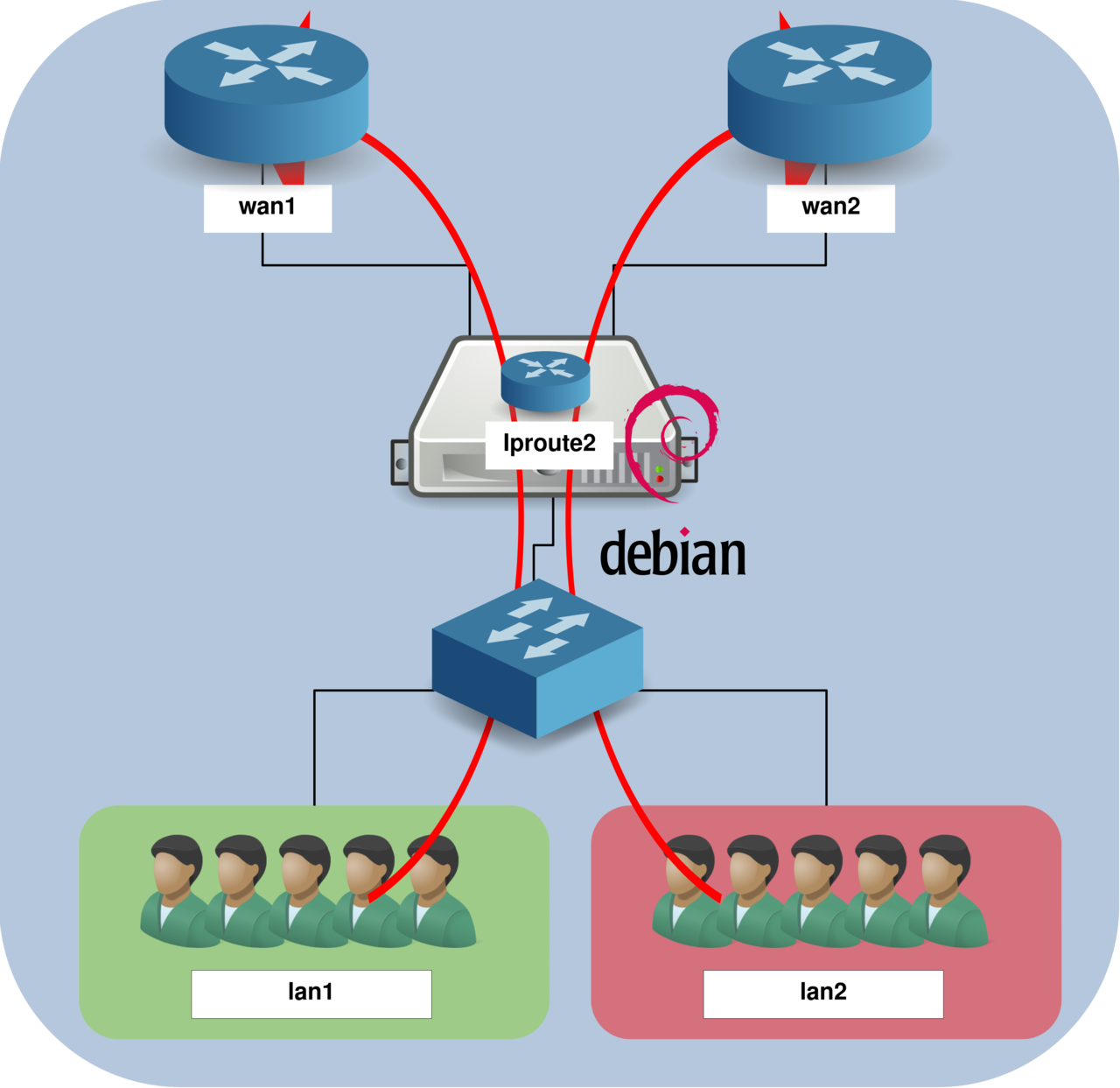
LAN Network Configuration
Let's focus on the LAN side. In this example, LAN1/VLAN10 uses the 192.168.1.0/24 network, while LAN2/VLAN20 uses 192.168.2.0/24. To handle both networks, we will configure a trunk interface on the Debian server using a single physical interface (named lan).
This approach allows multiple VLANs to be carried over the same interface. Note that you can also use separate physical interfaces for each LAN if your server has enough network cards.
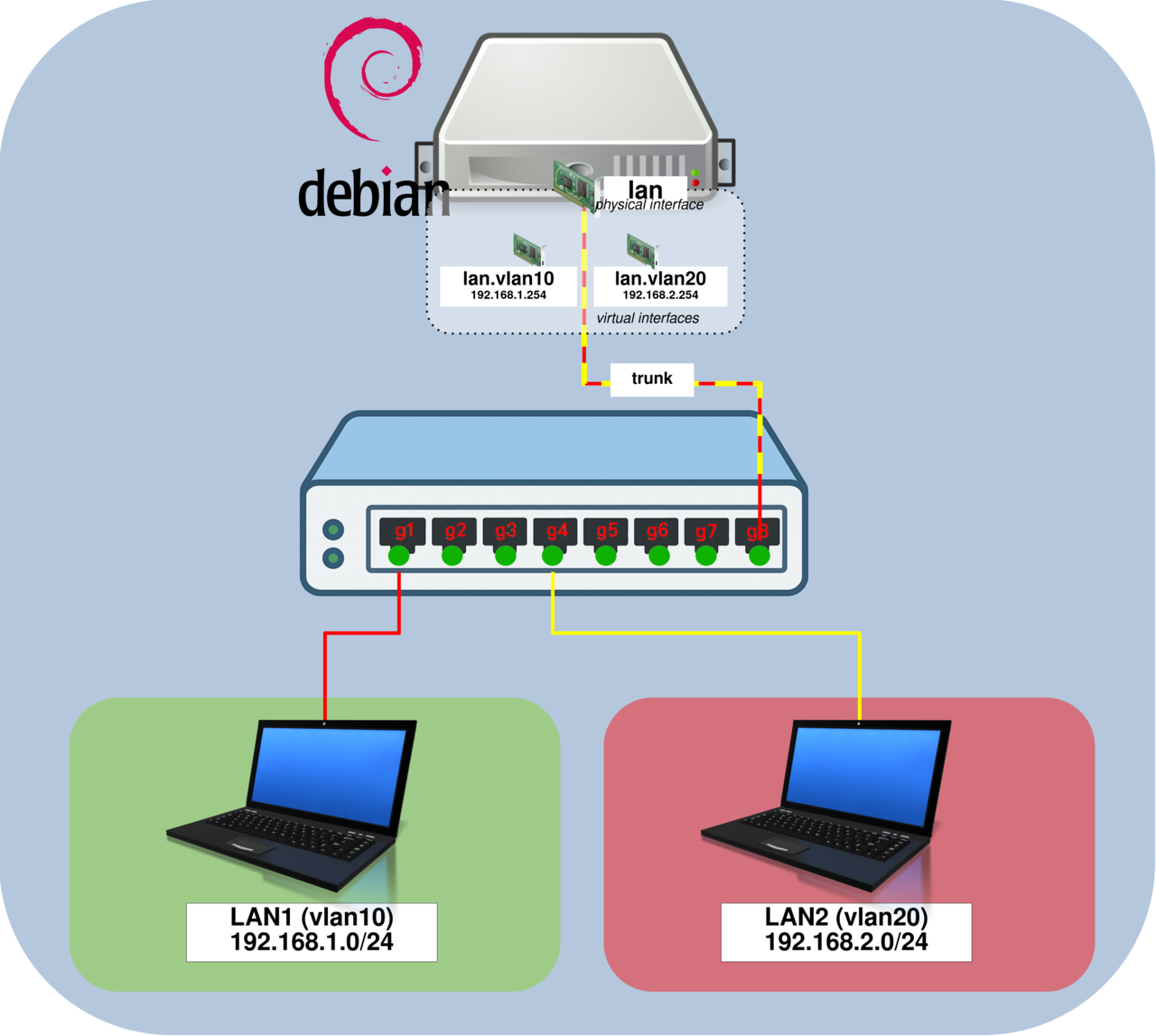
Debian VLAN Configuration (Trunk Mode)
This section explains how to configure the lan interface in trunk mode for VLAN 10 and VLAN 20 using iproute2. You will learn later how to automate this configuration so it runs automatically at system startup.
This configuration separates network traffic using VLANs and connects them to a Linux router through a trunk link.
- Create VLAN interfaces
lan.vlan10andlan.vlan20, then assign IP addresses:
root@host:~# ip link add link lan name vlan10 type vlan id 10
root@host:~# ip link add link lan name vlan20 type vlan id 20
root@host:~# ip link set vlan10 up
root@host:~# ip link set vlan20 up
root@host:~# ip addr add 192.168.1.254/24 dev vlan10
root@host:~# ip addr add 192.168.2.254/24 dev vlan20
Switch Configuration
In this section, we will configure a network switch positioned between the LAN segments and the Debian gateway. This switch will handle VLAN traffic and forward it to the trunk interface on the router.
- Configure interface
g1as an access port for VLAN 10:
switch# configure terminal
switch(config)# interface g1
switch(config-if)# switchport mode access
switch(config-if)# switchport access vlan 10- Configure interface
g4as an access port for VLAN 20:
switch# configure terminal
switch(config)# interface g4
switch(config-if)# switchport mode access
switch(config-if)# switchport access vlan 20- Configure interface
g8as a trunk port for VLAN 10 and VLAN 20:
switch# configure terminal
switch(config)# interface g8
switch(config-if)# switchport mode trunk
switch(config-if)# switchport trunk allowed vlan add 10,20
WAN Configuration (NAT and Policy-Based Routing)
In this section, we will configure the WAN side of the Linux router. This includes setting up nftables rules to perform NAT (Network Address Translation) on the wan1 and wan2 interfaces, as well as implementing policy-based routing (PBR) to control traffic flow.
We will also show how to automate this configuration by running a shell script at system startup.
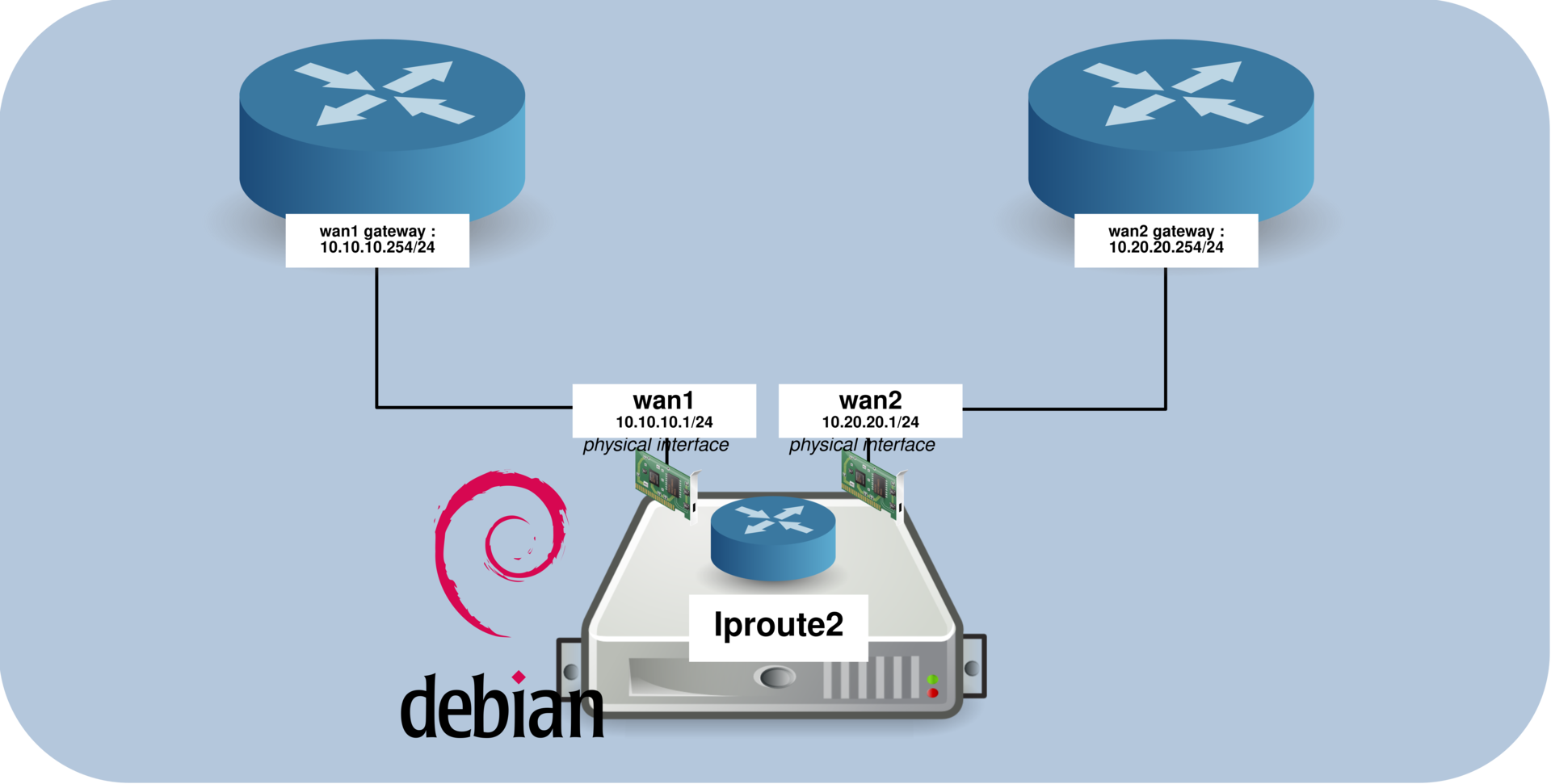
Routing and Policy-Based Routing (PBR)
- Enable IP forwarding to allow the Linux system to route packets between interfaces:
root@host:~# sysctl net.ipv4.ip_forward=1- Edit the
/etc/iproute2/rt_tablesfile and add a custom routing table that we will use to route throughwan2(used for LAN2 traffic):
#
# reserved values
#
255     local
254     main
253     default
0       unspec
#
# local
#
#1      inr.ruhep
200 table.wan2- Add a default route in the
wan2routing table:
root@host:~# ip route add default via 10.20.20.254 dev wan2 table table.wan2- Add policy-based routing rules to route LAN2 traffic through
wan2. The first rule ensures that traffic generated by the router uses the main routing table, while the second rule routes LAN2 subnet traffic through thewan2table:
root@host:~# ip rule add prio 160 from 192.168.20.254 lookup main
root@host:~# ip rule add prio 161 from 192.168.20.0/24 table table.wan2
These rules ensure that traffic originating from the LAN2 subnet is routed through the wan2 interface, while the router's own traffic continues to use the main routing table.
/etc/network/interfaces Configuration
- Edit the
/etc/network/interfacesfile and configure the following interfaces:wan1: the primary WAN interface with the default routewan2: the secondary WAN interface used for LAN2 traffic (via policy-based routing)lan: the LAN interface without an IP address (configured later usingip addr add), which also runs the/usr/local/sbin/pbr.shscript at startup
# This file describes the network interfaces available on your system
# and how to activate them. For more information, see interfaces(5).

source /etc/network/interfaces.d/*

# The loopback network interface
auto lo
iface lo inet loopback

# The primary network interface
allow-hotplug wan1
iface wan1 inet static
        address 10.10.10.1
        netmask 255.255.255.0
        gateway 10.10.10.254

allow-hotplug wan2
iface wan2 inet static
        address 10.20.20.1
        netmask 255.255.255.0

allow-hotplug lan
iface lan inet manual
	up /usr/local/sbin/pbr.sh
nftables Configuration (NAT)
To allow the LAN networks to access the Internet through the wan1 and wan2 interfaces, we need to configure NAT (Network Address Translation) using nftables.
- Edit the
/etc/nftables.conffile to define NAT rules:
#!/usr/sbin/nft -f

flush ruleset

table inet filter {
        chain input {
                type filter hook input priority 0; policy accept;
        }
        chain forward {
                type filter hook forward priority 0; policy accept;
        }
        chain output {
                type filter hook output priority 0; policy accept;
        }
}

table ip my_nat {
        chain my_masquerade {
                type nat hook postrouting priority 100; policy accept;
                ip daddr != { 10.0.0.0/8, 192.168.0.0/16 } oifname "wan1" masquerade comment "outgoing NAT on wan1"
                ip daddr != { 10.0.0.0/8, 192.168.0.0/16 } oifname "wan2" masquerade comment "outgoing NAT on wan2"
        }
}- Enable and start the
nftablesservice:
root@host:~# systemctl enable nftables.serviceroot@host:~# systemctl restart nftables.serviceMake It Persistent (Startup Script)
- To make the configuration persistent across reboots, create the
/usr/local/sbin/pbr.shscript:
#! /bin/sh
# --- VLAN configuration ---
ip link add link lan name vlan10 type vlan id 10
ip link add link lan name vlan20 type vlan id 20

ip link set vlan10 up
ip link set vlan20 up

ip addr add 192.168.1.254/24 dev vlan10
ip addr add 192.168.2.254/24 dev vlan20

# --- Enable IP forwarding ---
sysctl net.ipv4.ip_forward=1

# --- Routing table configuration ---
[ $(grep -q 200 /etc/iproute2/rt_tables; echo $?) -ne 0 ] && echo "200     table.wan2" >> /etc/iproute2/rt_tables

# --- Default route for wan2 table ---
ip route add default via 10.20.20.254 dev wan2 table table.wan2

# --- Policy-Based Routing rules ---
# Router's own traffic uses main table
ip rule add prio 160 from 192.168.20.254 lookup main

# LAN2 traffic uses wan2 table
ip rule add prio 161 from 192.168.20.0/24 table table.wan2- Make the script executable:
root@host:~# chmod +x /usr/local/sbin/pbr.shVerification Commands
- Display routes from the
table.wan2routing table:
root@host:~# ip route show table table.wan2
default via 10.20.20.254- Display policy-based routing rules:
root@host:~# ip rule show- Display all routing tables:
root@host:~# ip route show table all- Check which route is used for a specific destination:
root@host:~# ip route get 8.8.8.8