
How to Monitor Dell PowerEdge Servers Using Python and SNMPv3
- Last updated: Nov 13, 2026

If, like me, you have to manage a dozen million (I might be exaggerating just a tiny bit here) Dell PowerEdge servers, you probably want to make sure they're all in good health. Indeed, the more servers you manage, the more likely you are to encounter hardware failures, and the harder it becomes to monitor everything manually. That's why I've developed my own monitoring script (without the help of AI! The quality of the code should be proof enough... 😅).
Historically, I used check_openmanage, a Perl-based Nagios plugin developed by the University of Oslo. Unfortunately, it hasn't been updated in quite some time, and its original website seems to have disappeared from the Internet. Moreover, it required Dell OpenManage to be installed, which could be quite a headache on Linux distributions, especially those not officially supported by Dell.
Since I couldn't find a suitable replacement, I decided to develop my own solution: a Python script that sends SNMP requests directly to the servers' iDRAC interfaces to monitor their hardware health. To achieve this, I used PySNMP, a cross-platform, pure-Python SNMP engine implementation. This means there's no need to install Dell OpenManage or any additional monitoring agent on the servers' operating systems. All you need is a properly configured iDRAC interface with SNMP enabled.
My main requirements when developing this script were to use SNMPv3 exclusively and to make it run on both Windows and Linux, without requiring Dell OpenManage or any additional agent on the monitored servers.
Monitoring Architecture
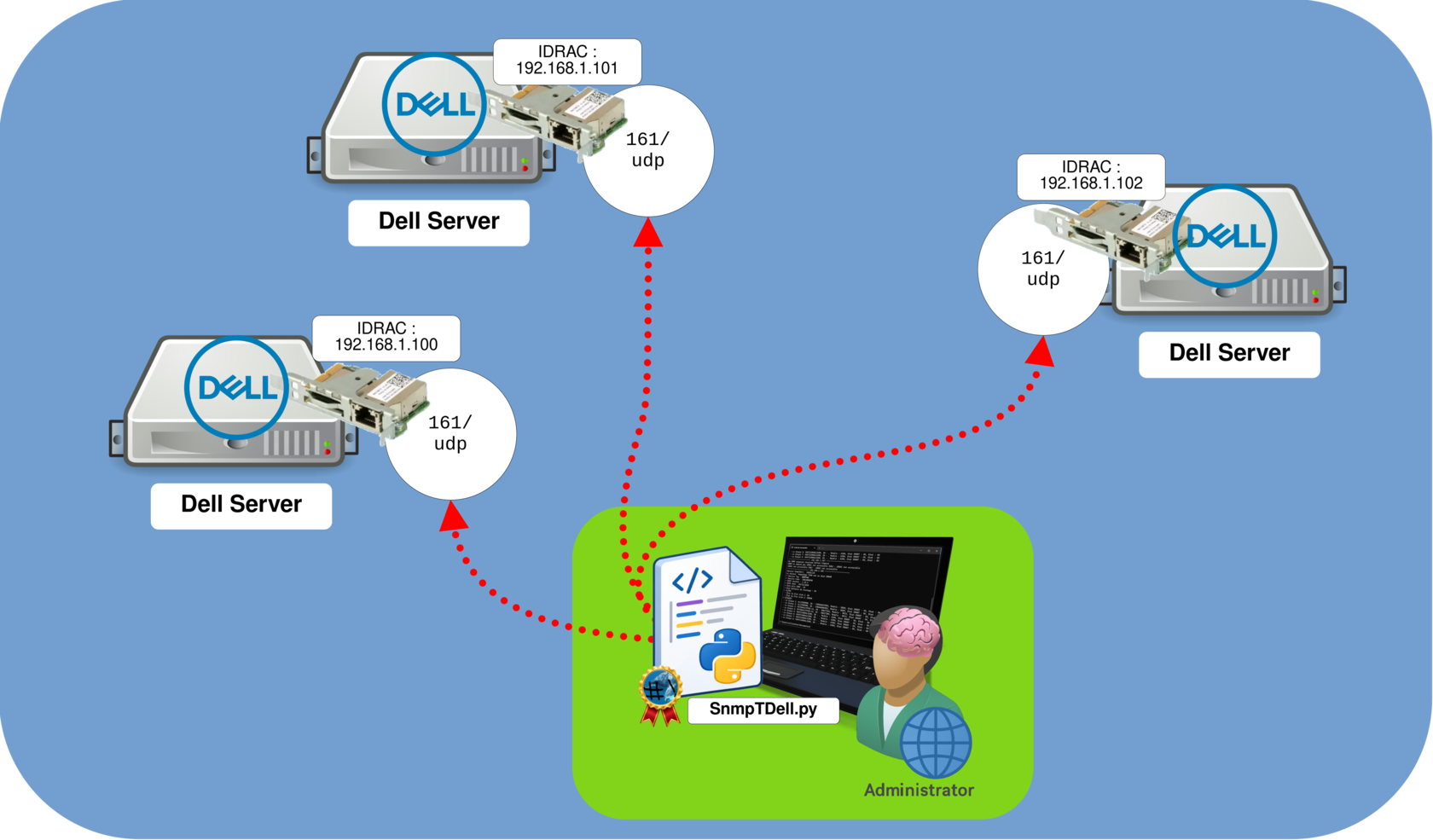
The architecture is pretty straightforward: the SnmpTDell Python script runs on a Windows or Linux machine that can reach the iDRAC interfaces of the Dell PowerEdge servers we want to monitor.
The script communicates directly with each iDRAC interface using SNMPv3 over UDP port 161 to retrieve hardware health information. Since the monitoring is performed through iDRAC, there's no need to install any additional agent on the monitored servers.
Install Python on Windows or Linux
As mentioned in the introduction, the SnmpTDell Python script can run on either Windows or Linux machines. While Python is already installed by default on many Linux distributions, you may need to install it manually. On Windows, you'll generally need to install Python before running the script.
Windows
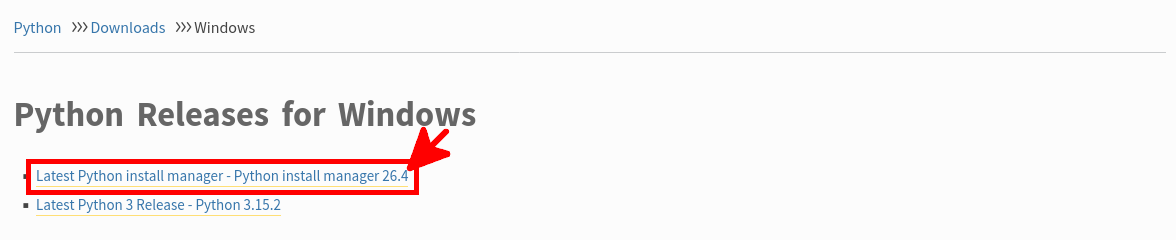
To install Python on Windows, visit the official Python download page and download the latest Python Install Manager. Run the installer, then use it to install Python.
- Once Python is installed, open a Windows terminal and install the required
pysnmpandcryptographypackages:
C:\Users\user> py -m pip install pysnmp cryptographyInstall Python on Debian
The following procedure is based on Debian 13, but it should also work on most Linux distributions with a few adjustments.
- Install the
python3-venvpackage to enable the creation of Python virtual environments:
root@host:~# apt update && apt install python3-venv- As a regular user, create a dedicated Python virtual environment for the SnmpTDell script:
john@host:~$ python3 -m venv .snmptdell- Activate the Python virtual environment:
john@host:~$ source .snmptdell/bin/activate- Install the required
pysnmpandcryptographypackages inside the virtual environment:
(.snmptdell) john@host:~$ python3 -m pip install pysnmp cryptographyConfigure SNMPv3 on Dell iDRAC
We now need to configure SNMPv3 on the Dell iDRAC interface. To do so, we'll create a dedicated user account that will be used by our Python monitoring script to retrieve hardware health information.
For security reasons, I recommend using a dedicated account with only the minimum required privileges. This way, if the credentials are compromised, the potential impact will be limited. Since our script only retrieves monitoring information, there's no need to grant administrative privileges.
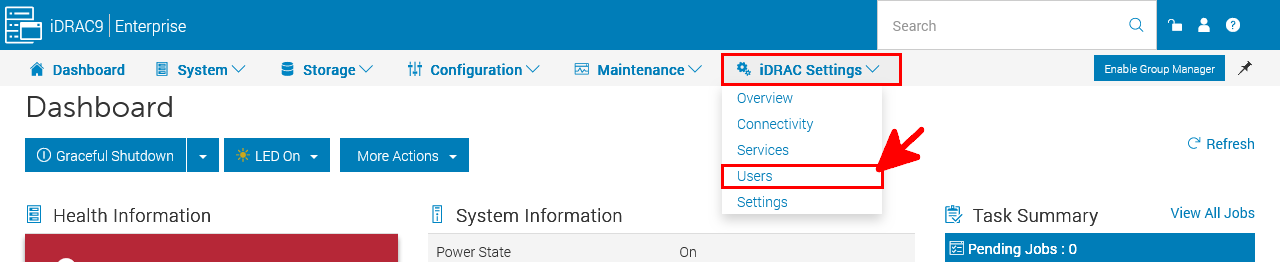
- Connect to the iDRAC web interface using HTTPS and navigate to iDRAC Settings > Users:
- Under Local Users, click Add to create a new dedicated SNMPv3 monitoring account:
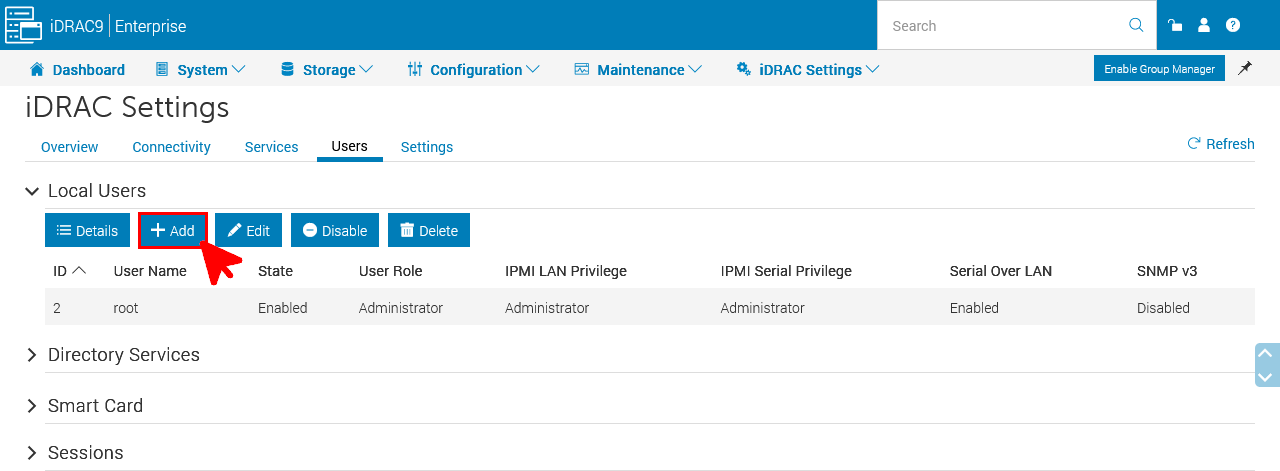
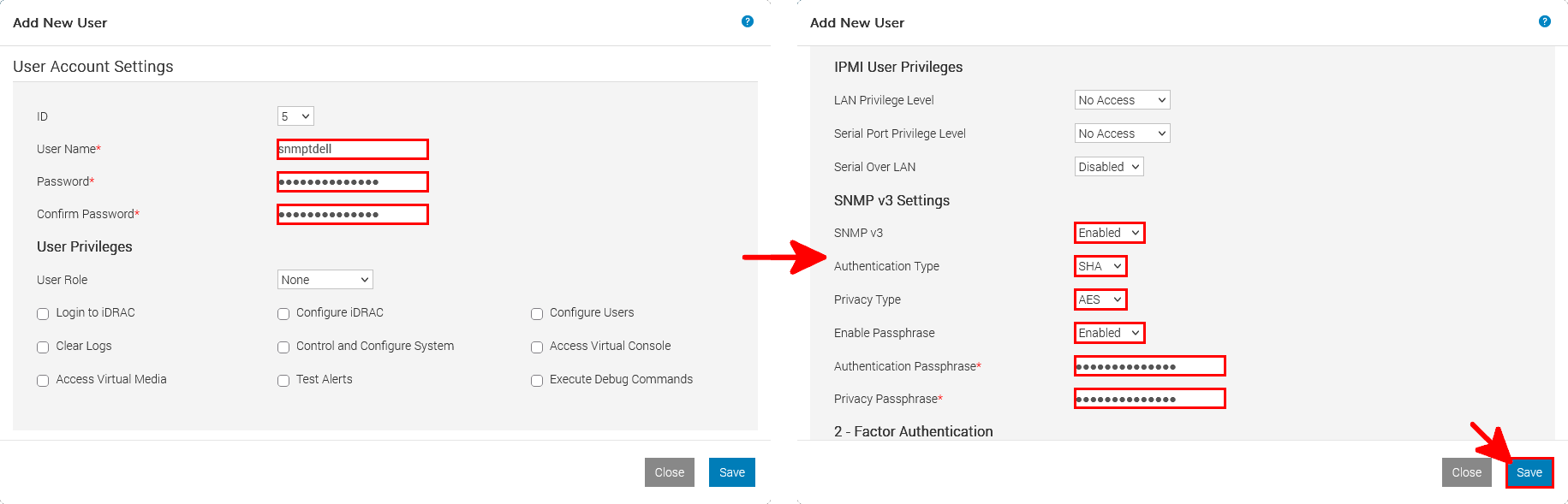
- Configure the dedicated SNMPv3 monitoring account with the following settings:
- User Name: Enter a dedicated username, such as
snmptdell. - Password: Set a strong password.
- User Role: Select
Noneand leave all iDRAC user privileges unchecked. - IPMI User Privileges: Set both LAN and Serial Port privilege levels to
No Accessand disable Serial Over LAN. - SNMP v3: Select
Enabled. - Authentication Type: Select
SHA. - Privacy Type: Select
AES. - Enable Passphrase: Select
Enabledand configure strong authentication and privacy passphrases.
- User Name: Enter a dedicated username, such as
- Once everything is configured, click Save to create the account.
Python Script SnmpTDell.py
Dell iDRAC SNMP OIDs
As explained in the introduction, the SnmpTDell Python script uses SNMPv3 to retrieve hardware information from Dell iDRAC interfaces. Each piece of information is identified by an Object Identifier (OID), which allows the script to query specific hardware components and retrieve their status.
The following table lists the SNMP OIDs referenced in the script, including system information, BIOS, batteries, physical disks, and power supplies.
For more information about these OIDs and their possible values, you can refer to the official Dell iDRAC SNMP Reference Guide.
| Dell iDRAC SNMP OIDs | |||
|---|---|---|---|
| Name | Object ID (OID) | Description | Notes / Values |
| System Information | |||
| systemServiceTag | 1.3.6.1.4.1.674.10892.5.1.3.2.0 | Returns the Dell Service Tag of the server. | Unique identifier used for Dell support and warranty identification. |
| systemFQDN | 1.3.6.1.4.1.674.10892.5.1.3.1.0 | Returns the fully qualified domain name (FQDN) of the server. | Used to identify the monitored server. |
| systemExpressServiceCode | 1.3.6.1.4.1.674.10892.5.1.3.3.0 | Returns the Dell Express Service Code. | Alternative identifier used by Dell support. |
| systemModelName | 1.3.6.1.4.1.674.10892.5.1.3.12.0 | Returns the server model name. | Used to identify the Dell PowerEdge model. |
| globalSystemStatus | 1.3.6.1.4.1.674.10892.5.2.1.0 | Returns the overall hardware health status of the server. | 1=Other, 2=Unknown, 3=OK, 4=Non-critical, 5=Critical, 6=Non-recoverable. |
| Battery and BIOS | |||
| batteryState | 1.3.6.1.4.1.674.10892.5.5.1.20.130.15.1.4.1 | Returns the current state of the storage controller battery. | 1=Unknown, 2=Ready, 3=Failed, 4=Degraded, 5=Missing, 6=Charging, 7=Below threshold. Instance 1. |
| BIOS version | 1.3.6.1.4.1.674.10892.5.4.300.50.1.8.1.1 | Returns the installed system BIOS firmware version. | Useful for identifying the installed BIOS version. |
| BIOS release date | 1.3.6.1.4.1.674.10892.5.4.300.50.1.7.1.1 | Returns the release date of the installed system BIOS. | Useful for tracking BIOS firmware versions. |
| CMOS battery status | 1.3.6.1.4.1.674.10892.5.4.200.10.1.52.1 | Returns status information associated with the CMOS battery. | Used to detect potential CMOS battery issues. Availability may vary by server model. |
| Physical and Virtual Disks | |||
| physicalDiskProductID | 1.3.6.1.4.1.674.10892.5.5.1.20.130.4.1.6 | Returns the model or product identifier of a physical disk. | Requires a disk instance index. |
| physicalDiskNumber | 1.3.6.1.4.1.674.10892.5.5.1.20.130.4.1.1 | Identifies an entry in the physical disk table. | Used to identify disk instances. Does not necessarily represent the physical drive bay. |
| physicalDiskComponentStatus | 1.3.6.1.4.1.674.10892.5.5.1.20.130.4.1.24 | Returns the hardware health status of a physical disk. | 1=Other, 2=Unknown, 3=OK, 4=Non-critical, 5=Critical, 6=Non-recoverable. |
| physicalDiskSmartAlertIndication | 1.3.6.1.4.1.674.10892.5.5.1.20.130.4.1.31 | Indicates whether a physical disk has reported a predictive failure alert. | Used to detect potential disk failures before they occur. |
| physicalDiskSerialNo | 1.3.6.1.4.1.674.10892.5.5.1.20.130.4.1.7 | Returns the serial number of a physical disk. | Useful for identifying a specific disk when investigating hardware failures. |
| physicalDiskRevision | 1.3.6.1.4.1.674.10892.5.5.1.20.130.4.1.8 | Returns the firmware revision of a physical disk. | Used to identify the installed disk firmware version. |
| Power Supplies | |||
| powerSupplyStatus | 1.3.6.1.4.1.674.10892.5.4.600.12.1.5 | Returns the hardware health status of a power supply unit (PSU). | 1=Other, 2=Unknown, 3=OK, 4=Non-critical, 5=Critical, 6=Non-recoverable. Requires an instance index. |
SnmpTDell.py - Python SNMPv3 Monitoring Script
Copy the following Python monitoring script into a file named SnmpTDell.py on the Windows or Linux machine that will communicate with the iDRAC interfaces of the Dell PowerEdge servers you want to monitor.
#! /usr/bin/python
import asyncio
from pysnmp.hlapi.v3arch.asyncio import *
import re
# Modules used to test host reachability with ping
import subprocess
import platform

# Script version
v_script = "20261110"
# Device information
auth_proto = usmHMACSHAAuthProtocol  # or usmHMACMD5AuthProtocol
priv_proto = usmAesCfb128Protocol      # or usmAesCfb128Protocol, usmAesCfb192Protocol, etc.

# Supported SNMP authentication and privacy protocols
SNMP_PROTOCOLS = [
    ("SHA512", "AES256", usmHMAC384SHA512AuthProtocol, usmAesCfb256Protocol),
    ("SHA1",   "AES128", usmHMACSHAAuthProtocol, usmAesCfb128Protocol),
    ("MD5",    "DES",    usmHMACMD5AuthProtocol,       usmDESPrivProtocol),
    ("SHA256", "AES256", usmHMAC192SHA256AuthProtocol, usmAesCfb256Protocol),
    ("SHA256", "AES128", usmHMAC192SHA256AuthProtocol, usmAesCfb128Protocol),
]

# Device information
liste_oid = { "servicetag": '1.3.6.1.4.1.674.10892.5.1.3.2.0', "nom_serveur": '1.3.6.1.4.1.674.10892.5.1.3.1.0', "servicecode": '1.3.6.1.4.1.674.10892.5.1.3.3.0', "modele": '1.3.6.1.4.1.674.10892.5.1.3.12.0', "statut_global": '1.3.6.1.4.1.674.10892.5.2.1.0', "status_battery": '1.3.6.1.4.1.674.10892.5.5.1.20.130.15.1.4.1', "bios_version": '1.3.6.1.4.1.674.10892.5.4.300.50.1.8.1.1', "bios_releasedate": '1.3.6.1.4.1.674.10892.5.4.300.50.1.7.1.1', "cmos_battery": '1.3.6.1.4.1.674.10892.5.4.200.10.1.52.1' }
liste_oid_disques = { "nom_disque": '1.3.6.1.4.1.674.10892.5.5.1.20.130.4.1.6', "emplacement_disque": '1.3.6.1.4.1.674.10892.5.5.1.20.130.4.1.1', "status_disques": '1.3.6.1.4.1.674.10892.5.5.1.20.130.4.1.24', "status_smart": '1.3.6.1.4.1.674.10892.5.5.1.20.130.4.1.31', "status_vd": '1.3.6.1.4.1.674.10892.5.5.1.20.140.1.1.4', "sn_disques": '1.3.6.1.4.1.674.10892.5.5.1.20.130.4.1.7', "modele_disques": '1.3.6.1.4.1.674.10892.5.5.1.20.130.4.1.8' }
liste_oid_alim = { "ps_status": '1.3.6.1.4.1.674.10892.5.4.600.12.1.5' }
resultats = []

class Disques(object):
        "Disk information container"

class Alimentations(object):
        "Power supply information container"

# Server class definition
class Serveur(object):
        def __init__(self, disques, alimentations, servicetag):
                self.disques = disques
                self.alimentations = alimentations
                self.servicetag = servicetag

        def afficher_info(self):
                print(f"Brand: {self.marque}, Model: {self.modele}")


# Detect the supported SNMP authentication and privacy protocol combination
async def detect_snmp_protocols(host, user, authkey, privkey, test_oid='1.3.6.1.4.1.674.10892.5.1.3.2.0', port=161):
    for auth_name, priv_name, auth_proto, priv_proto in SNMP_PROTOCOLS:
        #print(f"Test {auth_name} + {auth_proto} + {priv_name} + {priv_proto} on {host}...")

        try:
            errorIndication, errorStatus, errorIndex, varBinds = await get_cmd(
                SnmpEngine(),
                UsmUserData(
                    user,
                    authKey=authkey,
                    privKey=privkey,
                    authProtocol=auth_proto,
                    privProtocol=priv_proto,
                ),
                await UdpTransportTarget.create(
                    (host, port),
                    timeout=2,
                    retries=0
                ),
                ContextData(),
                ObjectType(ObjectIdentity(test_oid))
            )

            if errorIndication:
                #print(f"  Failed: {errorIndication}")
                continue

            if errorStatus:
                print(f"  SNMP error: {errorStatus.prettyPrint()}")
                continue

            #print(f"  OK : {auth_name} + {auth_proto} + {priv_name} + {priv_proto}")

            return auth_proto, priv_proto

        except Exception as e:
            print(f"  Exception : {e}")

    return None, None

# Execute SNMP GET and BULK WALK requests
async def snmp(host, port, user, authkey, privkey, auth_proto, priv_proto, start_oid, type="walk"):
    resultats = [] # Reset the results list
    if type=="get":
        #async def run_snmp_get():
            iterator = await get_cmd(
            SnmpEngine(),
            UsmUserData(
                user,
                authKey=authkey,
                privKey=privkey,
                authProtocol=auth_proto,
                privProtocol=priv_proto,
            ),
            await UdpTransportTarget.create((host, port)),
            ContextData(),
            ObjectType(ObjectIdentity(start_oid)),
                        lookupMib=False, # Return numeric OIDs (e.g. 1.3.6.1.4.1.674) instead of MIB names
            )

            errorIndication, errorStatus, errorIndex, varBinds = iterator

            if errorIndication:
                print(errorIndication)

            elif errorStatus:
                print(
                "{} at {}".format(
                errorStatus.prettyPrint(),
                errorIndex and varBinds[int(errorIndex) - 1][0] or "?",
                )
            )

            else:
                for varBind in varBinds:
                    #print(" = ".join([x.prettyPrint() for x in varBind]))
                    return (" = ".join([x.prettyPrint() for x in varBind]))

    if type=="walk":
            snmpEngine = SnmpEngine()
            errorIndication, errorStatus, errorIndex, varBindTable = await bulk_cmd(
                    snmpEngine,
                    UsmUserData(user,
                    authKey=authkey,
                    privKey=privkey,
                    authProtocol=auth_proto,
                    privProtocol=priv_proto,
                    ),
                    await UdpTransportTarget.create((host, port)),
                    ContextData(),
                    0,
                    150,
                    #*varBinds,
                    ObjectType(ObjectIdentity(start_oid)),
                    lookupMib=False, # Return numeric OIDs (e.g. 1.3.6.1.4.1.674) instead of MIB names
            )

            if errorIndication:
                    print(errorIndication)
            elif errorStatus:
                    print(
                        f"{errorStatus.prettyPrint()} at {varBinds[int(errorIndex) - 1][0] if errorIndex else '?'}"
                    )
            else:
                    for varBind in varBindTable:
                        # Workaround: filter BULK results by the requested OID prefix to avoid unrelated entries
                        TEST = str(start_oid + '.').split('10892')[1] # Extract the part after the enterprise branch 10892
                        if TEST in str(" = ".join([x.prettyPrint() for x in varBind])): # Keep only entries matching the requested OID branch
                           #print(" = ".join([x.prettyPrint() for x in varBind]))
                           #return varBind
                           #return (" = ".join([x.prettyPrint() for x in varBind]))
                           resultats.append(" = ".join([x.prettyPrint() for x in varBind]))
            return resultats

            varBinds = varBindTable

def check_host(host, user, authkey, privkey, port=161, auth_proto=usmHMACSHAAuthProtocol, priv_proto=usmAesCfb128Protocol):
    "Check iDRAC reachability with ping, then SNMP."
    # Ping test
    # Prepare the ping command
    system = platform.system().lower() # Detect the operating system
    ip = host
    if system == "windows":
        cmd = ["ping", "-n", "1", "-w", "100", ip]
    else:
        cmd = ["ping", "-c", "1", "-W", "1", ip]

    try:
        result = subprocess.run(
            cmd,
            stdout=subprocess.DEVNULL,
            stderr=subprocess.DEVNULL,
            timeout=2
        )
    except subprocess.TimeoutExpired:
        print("IP address is not responding; iDRAC is unreachable")
        return "pingko" # Return immediately
    else:
        # Check for a failed response
        if result.returncode != 0:
            print("IP address is not responding; iDRAC is unreachable")
            return "pingko" # Return immediately

    # Check the SNMP connection
    try:
        test_conn=asyncio.run(snmp(host, 161, user, authkey, privkey, auth_proto, priv_proto, liste_oid["servicetag"], type="get"))
    except:
        print("SNMP is not responding; iDRAC is unreachable")
        return "snmpko" # Return immediately
    else:
        # Check for an empty SNMP response
        if test_conn is None:
            print("SNMP is not responding; iDRAC is unreachable")
            return "snmpko" # Return immediately


def get_info(host, user, authkey, privkey, port=161, auth_proto=usmHMACSHAAuthProtocol, priv_proto=usmAesCfb128Protocol):
    "Retrieve server hardware information through SNMP."
    dst, subj = "", "SERVER STATUS OK"
    index_alims = []
    index_disques = []
    #########
    # SERVER #
    #########
    for nom, oid in liste_oid.items():
        res = asyncio.run(snmp(host, port, user, authkey, privkey, auth_proto, priv_proto, oid, type="get"))
        #snmp_walk(host, port, user, authkey, privkey, auth_proto, priv_proto, oid)
        for element in res:
            valeur = str(res).replace(' = ','=').split('=')[1]
            #oid = str(res).replace(' = ','=').split('=')[0]
            if nom == "servicetag":
                ObjDisques = Disques() # Create the disk object
                ObjAlims = Alimentations() # Create the power supply object
                ObjServeur = Serveur(ObjDisques, ObjAlims, servicetag=valeur) # Create the server object
            else:
                setattr(ObjServeur, nom, valeur)


    #########
    # DISKS  #
    #########
    res = asyncio.run(snmp(host, port, user, authkey, privkey, auth_proto, priv_proto, liste_oid_disques["emplacement_disque"]))
    for disque_id in res:
        emplacement_disque = str(disque_id).replace(' = ','=').split('=')[1] # Retrieve the disk identifier for each entry
        index_disques.append(emplacement_disque)
        for i in "nom_disque", "status_disques", "status_smart", "modele_disques", "sn_disques":
            res = asyncio.run(snmp(host, port, user, authkey, privkey, auth_proto, priv_proto, liste_oid_disques[i] + "." + emplacement_disque, type="get"))
            setattr(ObjServeur.disques, i + "_" + emplacement_disque, str(res).replace(' = ','=').split('=')[1])


    messages = {
        6: "WARNING",
        5: "ERROR",
        4: "WARNING",
        3: "OK",
        2: "WARNING",
        1: "UNKNOWN"
    }
    smart = {
        0: "OK",
        1: "ERROR"
    }
    batterie = {
        1: "UNKNOWN",
        2: "OK",
        3: "ERROR"
    }
    cmos = {
        1: "OTHER",
        2: "UNKNOWN",
        3: "OK",
        5: "ERROR"
    }
    print("SnmpTDell version:", v_script)
    print("Server", ObjServeur.nom_serveur + " " + ObjServeur.modele, "health status:", messages.get(int(ObjServeur.statut_global), "UNKNOWN"))
    subj = "Server " + ObjServeur.nom_serveur + " " + ObjServeur.modele + " health status: " + messages.get(int(ObjServeur.statut_global), "UNKNOWN")
    print("* Service Tag : " + ObjServeur.servicetag.replace(" ",""))
    print("* Service Code : " + ObjServeur.servicecode.replace(" ",""))
    print("* BIOS version : " + ObjServeur.bios_version.replace(" ",""))
    print("* BIOS release date: " + ObjServeur.bios_releasedate.replace(" ",""))
    if ObjServeur.cmos_battery == "No Such Instance currently exists at this OID":
        print("* CMOS battery status: Not available")
    else:
        print("* CMOS battery status: " + cmos.get(int(ObjServeur.cmos_battery.replace(" ","")), "UNKNOWN"))
    if ObjServeur.status_battery == "No Such Instance currently exists at this OID":
        print("* Storage controller battery status: No battery detected on this server")
    else:
        print("* Storage controller battery status: " + batterie.get(int(ObjServeur.status_battery.replace(" ","")), "UNKNOWN"))


    #######
    # PSUs  #
    #######
    res = asyncio.run(snmp(host, port, user, authkey, privkey, auth_proto, priv_proto, liste_oid_alim["ps_status"], type="walk"))
    for alim_id in res:
        emplacement_alim = str(alim_id).replace(' = ','=').split('=')[1] # Retrieve the power supply status
        index_alims.append(str(alim_id).replace(' = ','=').split('=')[0][-1]) # Store the power supply identifiers
        setattr(ObjServeur.alimentations, "ps_status_" + str(alim_id).replace(' = ','=').split('=')[0][-1], emplacement_alim)

    print("* POWER SUPPLIES:")
    for alim_id in index_alims:
        print(" - Power supply " + alim_id + ": " + messages.get(int(getattr(ObjServeur.alimentations, f"ps_status_{alim_id}")), "UNKNOWN"))
        #getattr(ObjServeur.alimentations, f"ps_status_{alim_id}"))

    #########
    # DISKS  #
    #########
    print("* DISKS:")
    for disque_id in index_disques:
        print(" - Disk " + disque_id + ":",
        getattr(ObjServeur.disques, f"nom_disque_{disque_id}") + ",",
        "SN :",
        getattr(ObjServeur.disques, f"sn_disques_{disque_id}") + ",",
        "Model:",
        getattr(ObjServeur.disques, f"modele_disques_{disque_id}") + ",",
        "SMART status:",
        #getattr(ObjServeur.disques, f"status_smart_{disque_id}") + ",",
        smart.get(int(getattr(ObjServeur.disques, f"status_smart_{disque_id}")), "UNKNOWN") + ",", \
        "Health status:", \
        messages.get(int(getattr(ObjServeur.disques, f"status_disques_{disque_id}")), "UNKNOWN"))
        #getattr(ObjServeur.disques, f"status_disques_{disque_id}"))
        getattr(ObjServeur.disques, f"nom_disque_{disque_id}") + ", " + \
        "SN: " + getattr(ObjServeur.disques, f"sn_disques_{disque_id}") + ", " + \
        "Model: " + getattr(ObjServeur.disques, f"modele_disques_{disque_id}") + ", " + \
        "SMART status: " + smart.get(int(getattr(ObjServeur.disques, f"status_smart_{disque_id}")), "UNKNOWN") + ", " + \
        "Health status: " + messages.get(int(getattr(ObjServeur.disques, f"status_disques_{disque_id}")), "UNKNOWN") + "\n"
    return subj

### READ CONFIGURATION FILE
with open('./conf.ini', 'r') as fichier:
    host = user = authkey = privkey = ""
    flag_mail = False
    for ligne in fichier:
        #print(ligne)
        if (re.search(r"\[.*\]", ligne) and flag_mail == False): # A new iDRAC IP address was found
            host = str(re.search(r"\[(.*?)\]", ligne).group(1))
            print("---------------------- " + host + " ----------------------")
            flag_mail = True
            continue # Continue to the next line
        if (re.search(r"\[.*\]", ligne) and flag_mail == True): # A new iDRAC IP address was found (multiple servers in the configuration)
            #resultat = check_host(host, user, authkey, privkey) # Check ping and SNMP connectivity
            auth_proto, priv_proto = asyncio.run(detect_snmp_protocols(host=host,user=user,authkey=authkey,privkey=privkey)) # Detect authentication and privacy protocols
            resultat = check_host(host, user, authkey, privkey, auth_proto=auth_proto, priv_proto=priv_proto)
            if resultat not in ("snmpko","pingko"):
                #corps, subj = get_info(host=host,user=user,authkey=authkey,privkey=privkey)
                subj = get_info(host=host,user=user,authkey=authkey,privkey=privkey, auth_proto=auth_proto, priv_proto=priv_proto)
                #print("BODY: " + corps + " SUBJECT: " + subj)
            if resultat == "snmpko":
                print("iDRAC unreachable")
            if resultat == "pingko":
                print("iDRAC unreachable")
            host = str(re.search(r"\[(.*?)\]", ligne).group(1))
            print("---------------------- " + host + " ----------------------")
        if re.search(r".* = .*", ligne):
            # Read the client name
            if str(ligne.replace(' = ','=').split('=')[0]) == 'client':
                client = str(re.findall(r"'(.*?)'", str(ligne.replace(' = ','=').split('=')[1]))[0])
            # Read the authentication key
            if str(ligne.replace(' = ','=').split('=')[0]) == 'authkey':
                authkey = str(re.findall(r"'(.*?)'", str(ligne.replace(' = ','=').split('=')[1]))[0])
            # Read the privacy (encryption) key
            if str(ligne.replace(' = ','=').split('=')[0]) == 'privkey':
                privkey = str(re.findall(r"'(.*?)'", str(ligne.replace(' = ','=').split('=')[1]))[0])
            # Read the SNMP username
            if str(ligne.replace(' = ','=').split('=')[0]) == 'user':
                user = str(re.findall(r"'(.*?)'", str(ligne.replace(' = ','=').split('=')[1]))[0])
            # Read the email settings
            if str(ligne.replace(' = ','=').split('=')[0]) == 'mail':
                mail = str(re.findall(r"'(.*?)'", str(ligne.replace(' = ','=').split('=')[1]))[0])
            # Read the email settings
            if str(ligne.replace(' = ','=').split('=')[0]) == 'smail':
                sender = str(re.findall(r"'(.*?)'", str(ligne.replace(' = ','=').split('=')[1]))[0])

    auth_proto, priv_proto = asyncio.run(detect_snmp_protocols(host=host,user=user,authkey=authkey,privkey=privkey)) # Detect authentication and privacy protocols
    resultat = check_host(host, user, authkey, privkey, auth_proto=auth_proto, priv_proto=priv_proto) # Check ping and SNMP connectivity
    if resultat not in ("snmpko","pingko"):
        subj = get_info(host=host,user=user,authkey=authkey,privkey=privkey, auth_proto=auth_proto, priv_proto=priv_proto)
    if resultat == "snmpko":
        print("iDRAC unreachable")
    if resultat == "pingko":
print("iDRAC unreachable")- The script reads a
conf.iniconfiguration file containing the iDRAC IP addresses and SNMPv3 credentials of the Dell PowerEdge servers we want to monitor. Each server has its own configuration section, allowing us to monitor multiple servers with a single script:
[192.168.1.100]
authkey = 'd0ntus31t' # Authentication passphrase
privkey = 'd0ntus31t' # Encryption passphrase
user = 'snmptdell' # SNMPv3 username

[192.168.1.101]
authkey = 'SnmpTDellR0CKS' # Authentication passphrase
privkey = 'SnmpTDellR0CKS' # Encryption passphrase
user = 'snmptdell' # SNMPv3 username

[192.168.1.102]
authkey = 'd0nuts31t' # Authentication passphrase
privkey = 'd0nuts31t' # Encryption passphrase
user = 'snmptdell' # SNMPv3 username
Run the SnmpTDell Python Script
Now that we have saved the SnmpTDell.py script and created the conf.ini configuration file, we're ready to run it!
Windows
- Open a Windows terminal, navigate to the directory containing the
SnmpTDell.pyscript and theconf.iniconfiguration file, then execute the following command:
C:\Users\user> py SnmpTDell.pyLinux
- Activate the Python virtual environment created earlier:
john@host:~$ source .snmptdell/bin/activate- Navigate to the directory containing the
SnmpTDell.pyscript and theconf.iniconfiguration file, then run the script:
(.snmptdell) john@host:~$ python3 SnmpTDell.pyMonitoring Results
Whether you're running SnmpTDell on Windows or Linux, you should see an output similar to the following, displaying the Dell PowerEdge server hardware health status, including BIOS information, batteries, power supplies, and physical disks:
---------------------- 192.168.1.100 ----------------------
SnmpTDell version: 20261110
Server SERVER01 PowerEdge R740 health status: OK
* Service Tag : DEADBEE5
* Service Code : 45142555000
* BIOS version : 2.22.1
* BIOS release date : ...
* CMOS battery status: OK
* Storage controller battery status: OK
* POWER SUPPLIES:
 - Power supply 1: OK
 - Power supply 2: OK
* DISKS:
 - Disk 1: ..., SN: ..., Model: ..., SMART status: OK, Health status: OK

---------------------- 192.168.1.101 ----------------------
IP address is not responding; iDRAC is unreachable
iDRAC unreachable

---------------------- 192.168.1.102 ----------------------
[…]Create a Standalone Executable with PyInstaller
As we've seen, running the SnmpTDell Python script requires installing Python and some additional libraries, such as PySNMP and cryptography. To avoid having to install these dependencies on every machine where we want to run the script, we can use PyInstaller to package everything into a standalone executable.
This makes our monitoring tool easier to distribute and run on other machines without requiring a separate Python installation. We'll see how to create executable versions of SnmpTDell for both Windows and Linux.
First, download the magnificent .ico file: SnmpTDell.ico, which we'll use as the application icon on Windows.
Windows
- Open a Windows terminal, navigate to the directory containing the
SnmpTDell.pyscript and theSnmpTDell.icoicon, then install PyInstaller:
C:\Users\user> py -m pip install pyinstaller- Create the standalone
SnmpTDell.exeexecutable using the--onefileoption to package everything into a single file and--iconto add our magnificent application icon:
C:\Users\user> py -m PyInstaller --onefile --icon SnmpTDell.ico SnmpTDell.py- Once the build is complete, you should find the
SnmpTDell.exeexecutable in thedistdirectory:

Copy the conf.ini configuration file into the same directory as SnmpTDell.exe, then open a terminal in that directory and run the executable:
C:\Users\user\dist> SnmpTDell.exeLinux
- First, install the required packages to build the SnmpTDell Linux executable. The following commands are intended for Debian 13:
root@host:~# apt update && apt install binutils python3-dev python3-venv- Activate the Python virtual environment created earlier:
john@host:~$ source .snmptdell/bin/activate- Install PyInstaller inside the virtual environment:
(.snmptdell) john@host:~$ python3 -m pip install pyinstaller- Navigate to the directory containing the
SnmpTDell.pyscript and create a standalone executable using the--onefileoption:
(.snmptdell) john@host:~$ python3 -m PyInstaller --onefile SnmpTDell.py- Once the build is complete, you should find the
SnmpTDellexecutable in thedistdirectory. Copy theconf.iniconfiguration file into this directory, then run the executable:
(.snmptdell) john@host:~$ cp conf.ini dist/
(.snmptdell) john@host:~$ cd dist
(.snmptdell) john@host:~/dist$ ./SnmpTDell
Conclusion
We've seen how to configure Dell iDRAC interfaces to accept SNMPv3 requests and how to use the SnmpTDell Python script to monitor the hardware health of our Dell PowerEdge servers from either a Windows or Linux machine.
With this solution, we can monitor multiple servers, check their hardware health, including physical disks, power supplies, and batteries, without installing Dell OpenManage or any additional agent on the monitored servers. We can also package the script into a standalone executable using PyInstaller, making it easier to deploy on other machines.